maandag 20 augustus 2012
No ULS log for web applications with a custom application pool account
dinsdag 20 april 2010
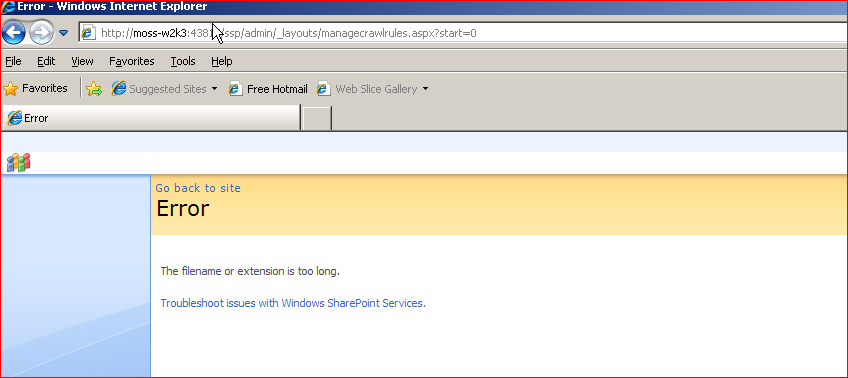
"The filename or extension is too long." when accessing MOSS CrawlRules FIX
Error when accessing the crawl rules with the SharePoint API:
Unhandled Exception: System.IO.PathTooLongException: The filename or extension is too long.
at Microsoft.Office.Server.Search.Administration.SearchApi.RunOnServer[T](CodeToRun`1 remoteCode, CodeToRun`1 localCode, Boolean useCurrentSecurityContext, Int32 versionIn)
at Microsoft.Office.Server.Search.Administration.SearchApi.RunOnServer[T](CodeToRun`1 remoteCode, CodeToRun`1 localCode, Int32 versionIn)
at Microsoft.Office.Server.Search.Administration.SearchApi.GetCrawlRuleList(Int32 versionIn)
at Microsoft.Office.Server.Search.Administration.CrawlRuleCollection..ctor(Content parent)
at Microsoft.Office.Server.Search.Administration.Content.get_CrawlRules()
You can fix this error by deleting the crawl rule from the registry. Check the following registry key
HKEY_LOCAL_MACHINE\SOFTWARE\Microsoft\Office Server\12.0\Search\Applications\90604ba8-1a0b-448d-87b6-9b5c04a69c9b\Gather\Portal_Content\Sites\*\Paths\0
and delete it.
After a reboot the crawl rules are accessible again.
Arnold thanks 4 the tip.
maandag 22 maart 2010
MOSS - Could not load file or assembly 'cablib' or one of its dependencies. An attempt was made to load a program with an incorrect format.
Could not load file or assembly 'cablib' or one of its dependencies. An attempt was made to load a program with an incorrect format.
This did not happen on the dev or test environment, so what is happening here? I found out that cablib.dll was accidentally included in the WSP package. The WSP wad targeting the BIN directory of several SharePoint webapps. (We use WSP builder to create our WSP packages.) Cablib.dll is compiled for 32-bit only, when adding this dll to the bin directory of a 64 bit ASP.Net application, asp.net dies quickly. This did not cause a problem for our dev and test environment because they are 32-bit machines!
The fix was simple, clean your output directories to remove the cablib.dll from your WSP package and upgrade the WSP.
zondag 12 oktober 2008
MOSS: Label policy – how does it really work
The policies in MOSS allow you to add some document management functionality to MOSS. For example you can specify a label policy to ensure a certain label is always added to your document. But how does this work?
When saving a document to a document library, or when creating a new document from a document library the server adds the policy information to the file. Note, the file must be Word 2007 docx file (2003 doc file should also work, I will test this). The following information is added to the docx.
In the customXml folder of the unzipped word document we find the file item2.xml:
<?mso-contentType?>
<p:Policy xmlns:p="office.server.policy" id="" local="true">
<p:Name>Document</p:Name>
<p:Description>Mypolicy desc</p:Description>
<p:Statement>Label mypolicy</p:Statement>
<p:PolicyItems>
<p:PolicyItem featureId="Microsoft.Office.RecordsManagement.PolicyFeatures.PolicyLabel">
<p:Name>Labels</p:Name>
<p:Description>Generates labels that can be inserted in Microsoft Office documents to ensure that document properties or other important information are included when documents are printed. Labels can also be used to search for documents.</p:Description>
<p:CustomData>
<label>
<event type="save"/>
<event type="print"/>
<segment type="literal">MyPolicy</segment>
</label>
</p:CustomData>
</p:PolicyItem>
</p:PolicyItems>
</p:Policy>
and item5.xml
<?xml version="1.0" encoding="utf-8"?>
<p:properties xmlns:p="http://schemas.microsoft.com/office/2006/metadata/properties" xmlns:xsi="http://www.w3.org/2001/XMLSchema-instance">
<documentManagement>
<DLCPolicyLabelLock xmlns="4d54d727-23fa-4efe-b6bd-38291cb8f05e" xsi:nil="true"/>
<DLCPolicyLabelClientValue xmlns="4d54d727-23fa-4efe-b6bd-38291cb8f05e">MyPolicy</DLCPolicyLabelClientValue>
<DLCPolicyLabelValue xmlns="4d54d727-23fa-4efe-b6bd-38291cb8f05e">MyPolicy</DLCPolicyLabelValue>
</documentManagement>
</p:properties>
So the policy rules are included in the document it self. The policy I added was myPolicy. Note the label policy does not work with the watermark functionality :(. I guess you can write a “Watermark” policy using the same strategy.
vrijdag 3 oktober 2008
Quick TIP: Skip folders Windows desktop search
We have a lot of documents on file shares. I use windows desktop search to index the file share. This works ok, but I also was getting a lot of older versions of documents. These documents are always stored in a "archive" directory, so I cracked open the help and found:
searchterm NOT in:archive
Instead of "in:" you can also use "foldername:". Works likes a charm!
zondag 10 augustus 2008
Windows Update fails
FATAL: Error: 0x80004002. wuauclt handler: failed to spawn COM server
Google to the rescue. The following fixed my problem (from a command prompt):
net stop wuauserv
regsvr32 wuapi.dll
regsvr32 wuaueng1.dll
regsvr32 wuaueng.dll
regsvr32 wucltui.dll
regsvr32 wups2.dll
regsvr32 wups.dll
regsvr32 wuweb.dll
net start wuauserv
Some extra info: http://support.microsoft.com/kb/910359.
donderdag 7 augustus 2008
Unable to connect to data.beta.mssds.com
While doing some tests on SQL Server Data Services (SSDS) at work I was unable to run my samples I created at home. At home they worked perfectly. The hostname could not be found for some dark reason. I was able to get the IP from a web based DNS lookup (http://www.zoneedit.com/lookup.html) and tried to get the REST and SOAP API to work with the IP address. The SOAP API works, but the rest API needs a valid hostname. The error included a nice call stack :), definitely some WCF love there.
The server encountered an error processing the request. The exception message is 'IsEqual: invalid host'. See server logs for more details. The exception stack trace is:
at Microsoft.Stratus.Common.Assert.IsEqual[T](T actual, T expected, String format, Object[] args)
at Microsoft.Stratus.Service.Metrics.RESTMessageHelper.GetAuthorityIdContainerIdFromRequest(Message& request, String& authorityId, String& containerId)
at Microsoft.Stratus.Service.Metrics.MetricsManager.CollectMetricsAfterReceiveRequest(Message& request)
at Microsoft.Stratus.Service.Metrics.SitkaMessageInspector.AfterReceiveRequest(Message& request, IClientChannel channel, InstanceContext instanceContext)
at System.ServiceModel.Dispatcher.ImmutableDispatchRuntime.AfterReceiveRequestCore(MessageRpc& rpc)
at System.ServiceModel.Dispatcher.ImmutableDispatchRuntime.ProcessMessage2(MessageRpc& rpc)
at System.ServiceModel.Dispatcher.MessageRpc.Process(Boolean isOperationContextSet)
Adding the host to my local host file solved the problem.